


Core Web Vitals Explained: Optimizing Your WordPress Site

WordPress powers over 43% of all websites worldwide, but having a popular CMS isn’t enough if your site performs poorly. Core Web Vitals for WordPress have become essential metrics that directly impact both your search rankings and user experience. If your site takes more than three seconds to load, you’ve already lost 40% of your potential visitors!
Since Google introduced Core Web Vitals as official ranking signals in 2021, they’ve only grown more important for SEO success. Specifically, these metrics measure three critical aspects of user experience: loading performance through Largest Contentful Paint (LCP), responsiveness with Interaction to Next Paint (INP), and visual stability via Cumulative Layout Shift (CLS). Furthermore, a WordPress site that loads quickly and responds smoothly has a measurable advantage over equally authoritative competitors with sluggish performance.
In this comprehensive guide, we’ll explore how to improve Core Web Vitals on your WordPress site through practical optimization techniques. From selecting lightweight themes to implementing caching solutions and CDNs, we’ll cover everything you need to know to boost your site’s performance. Essentially, optimizing your WordPress site for Core Web Vitals isn’t just about pleasing Google—it’s about delivering the seamless experience your visitors expect.
What are Core Web Vitals and why they matter
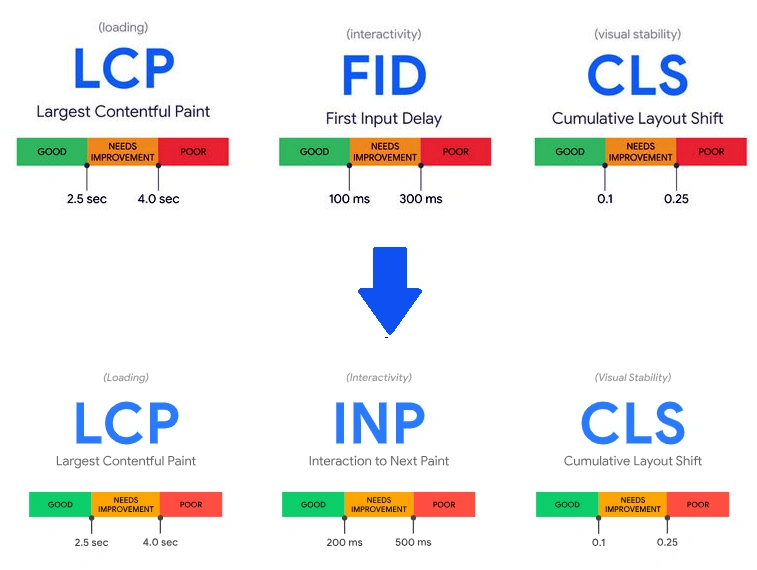
Core Web Vitals represent Google’s effort to quantify the user experience on websites through measurable metrics. These standardized measurements evaluate three distinct aspects of web performance that Google considers essential for all site owners to monitor. As official ranking signals, they directly impact how your WordPress site appears in search results while also influencing visitor satisfaction and engagement.
What sets Core Web Vitals apart is that they focus on real-world user experiences rather than technical specifications. To provide optimal user experience, your WordPress site should meet Google’s recommended thresholds at the 75th percentile of page loads across both mobile and desktop devices.
Largest Contentful Paint (LCP)
LCP measures how quickly the largest content element becomes visible after a user navigates to your page. This could be a hero image, video, or a large block of text—essentially whatever dominates your viewport when a visitor first lands on your WordPress site.
For good user experience, LCP should occur within 2.5 seconds of when the page starts loading. This timing matters because it represents when users perceive that your main content has loaded. Unlike older metrics that might not align with what visitors actually see, LCP provides a more accurate measurement of perceived loading speed.
The calculation focuses on the visible portion of the element within the viewport. Moreover, for resized images, LCP reports either the visible size or the intrinsic size, whichever is smaller. When optimizing a WordPress site, addressing server response times, resource loading speed, and render-blocking resources directly impacts your LCP score.
Interaction to Next Paint (INP)
INP evaluates your WordPress site’s responsiveness to user interactions throughout their entire visit. Unlike its predecessor (First Input Delay), INP considers all clicks, taps, and keyboard inputs—not just the first interaction—making it a comprehensive measurement of your site’s overall responsiveness.
A good INP score is 200 milliseconds or less. This metric captures the longest interaction (excluding outliers), measuring from the moment a user interacts with your page until the browser renders the next frame. The measurement includes input delay, processing time, and presentation delay.
For highly interactive WordPress pages with 50+ interactions, INP uses the 98th percentile to filter out extreme outliers. This matters because visitors expect immediate visual feedback when they interact with elements on your site—whether clicking a button, opening a menu, or submitting a form.
Cumulative Layout Shift (CLS)
CLS measures visual stability by calculating unexpected layout shifts during the entire page lifecycle. These shifts occur when elements move around while the page loads, creating a frustrating experience for users trying to interact with your WordPress site.
A good CLS score is 0.1 or less. Layout shifts happen when elements like images without set dimensions load, ads appear, or dynamic content gets injected. The score calculation combines two factors: impact fraction (percentage of viewport affected) and distance fraction (how far elements move).
Layout shifts primarily occur when ads are fetched and rendered, potentially displacing existing content. Additionally, common causes on WordPress sites include unspecified dimensions for media, dynamically injected content, late-loading fonts, and third-party elements.
Improving Core Web Vitals on your WordPress site isn’t just about appeasing Google’s algorithms—it directly enhances user experience. When page load times increase from 1 to 3 seconds, bounce rates jump by 32%, and at 6 seconds, they skyrocket by 106%. Therefore, optimizing these metrics translates to real business benefits through increased engagement and conversions on your WordPress site.
How Core Web Vitals affect SEO and user experience
In the digital landscape, Google’s search algorithm has evolved to prioritize websites that deliver exceptional user experiences. Core Web Vitals have become crucial performance indicators that can make or break your WordPress site’s visibility and effectiveness.
Why Google uses them as ranking signals
Google officially incorporated Core Web Vitals into its ranking algorithm in 2021 as part of the page experience update. This decision wasn’t arbitrary—it reflects Google’s commitment to prioritizing sites that provide users with fast, responsive, and visually stable experiences.
The page experience signal combines Core Web Vitals with existing factors like mobile-friendliness, safe browsing, HTTPS security, and intrusive interstitial guidelines. Consequently, this comprehensive approach evaluates how users perceive interactions with your WordPress site.
Although content relevancy still carries more weight in rankings, page experience serves as a valuable “tie-breaker”. In fact, when two pages offer similar content quality, the one with better Core Web Vitals scores has a distinct advantage. Plus, optimizing these metrics involves less guesswork than improving other ranking factors, as Google provides transparent performance data.
Impact on bounce rates and engagement
Poor site performance dramatically affects how visitors interact with your WordPress site. Research shows that over 50% of users abandon pages taking longer than three seconds to load. Conversely, improving Core Web Vitals metrics directly correlates with improved user retention and engagement.
According to a 2023 study, websites meeting Google’s Core Web Vitals thresholds were 24% less likely to experience high bounce rates. Similarly, improvements of just 0.1 seconds in site speed have been shown to increase conversion rates by up to 8%.
The connection between Core Web Vitals and user behavior appears strongest with First Input Delay (now INP), which showed some correlation with page views per session. This makes sense given that users become frustrated when they must wait to interact with elements on your WordPress site.
Real-world examples of performance gains
Numerous businesses have documented remarkable improvements after optimizing their Core Web Vitals:
- Vodafone (Italy) improved LCP by 31%, resulting in 8% more sales
- iCook improved CLS by 15%, achieving 10% more ad revenue
- Tokopedia improved LCP by 55% and saw 23% better average session duration
- NDTV gained a 50% better bounce rate after halving their LCP score
In one striking WordPress case study, a non-profit organization that initially had all URLs flagged as “Poor” in Google Search Console achieved “Good” Core Web Vitals across all pages. The results were impressive: search impressions increased by 35,000 monthly, website traffic grew by 7,000 sessions monthly, and their site achieved higher rankings for critical keyphrases.
Beyond SEO benefits, these improvements translate to tangible business outcomes. For instance, e-commerce sites that enhance their LCP and CLS scores typically see up to 15% more conversions, demonstrating that Core Web Vitals optimization isn’t just about pleasing algorithms—it’s about creating WordPress sites that truly perform for your visitors.
How to measure Core Web Vitals on WordPress
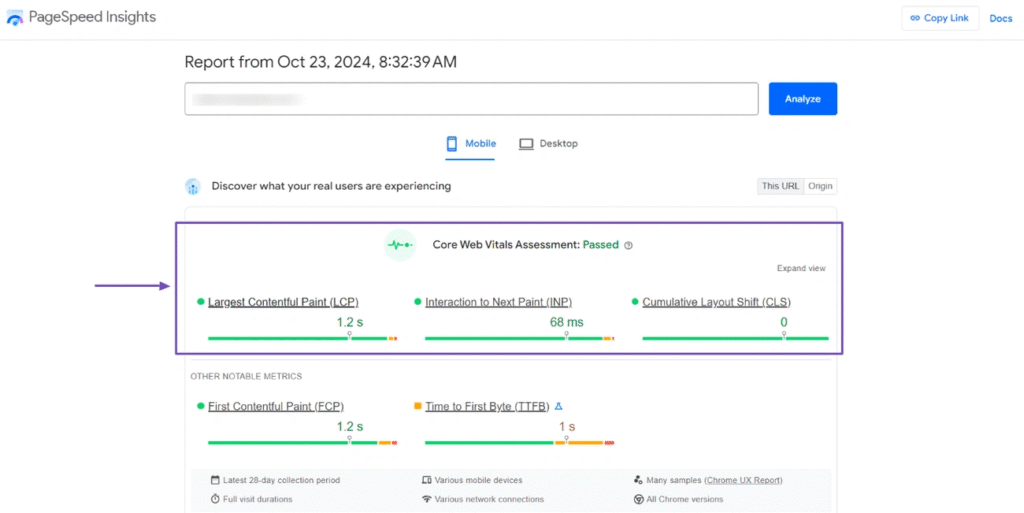
Measuring your website’s performance is the first crucial step toward improving it. To effectively optimize Core Web Vitals on WordPress, I’ll show you the best tools to accurately assess your site’s current performance status.
Using Google Search Console
Google Search Console (GSC) offers a dedicated Core Web Vitals report based on real-world usage data gathered from actual visitors to your WordPress site. This report categorizes your pages into “Good,” “Needs Improvement,” or “Poor” based on the three critical metrics—LCP, INP, and CLS.
What makes GSC particularly valuable is how it groups similar pages together when they share common issues. By clicking on each web vital issue, you can see specific groups of impacted pages. The report is conveniently split between mobile and desktop experiences, allowing you to prioritize optimizations where they matter most.
However, remember that GSC data represents a 28-day rolling period, so improvements will take time to reflect in your reports.
PageSpeed Insights and Lighthouse
PageSpeed Insights (PSI) serves as a comprehensive tool that combines the best of both worlds—showing both lab data and field data for your WordPress pages. The field data comes from the Chrome User Experience Report (CrUX), measuring how real users experience your site over the previous 28 days.
Meanwhile, Lighthouse, which powers the lab data portion of PSI, simulates page load under controlled conditions and provides diagnostics on performance, accessibility, best practices, and SEO. It’s also available as a standalone tool built directly into Chrome DevTools.
For WordPress site owners, PSI offers clear, actionable insights. Its Diagnostics section becomes your ally by highlighting specific elements causing poor performance. For instance, to identify your LCP element, simply expand the “Largest Contentful Paint element” tab in the Diagnostics section.
Field data vs lab data: what matters more
Field data captures real users’ experiences across various devices, network conditions, and locations. It represents a distribution rather than a single number, typically reported at the 75th percentile. Most importantly, Google explicitly uses field data—not lab data—for search rankings.
Lab data, in contrast, comes from testing in controlled environments with predefined device and network settings. While it doesn’t reflect actual user experience, it excels at debugging and identifying specific issues before they impact real users.
As a general rule, prioritize field data for strategic decisions, as it represents what real users actually experience. However, lab data remains invaluable during development and optimization phases because it provides detailed reports and reproducible results that help pinpoint specific problems.
For optimal results, I recommend using both: field data to understand the real-world impact and lab data to diagnose and fix the underlying issues affecting your WordPress site’s performance.
Common issues that hurt Core Web Vitals scores
Understanding what damages your Core Web Vitals scores is the first step toward fixing them. Most WordPress sites face several common performance obstacles that directly impact user experience and search rankings.
Heavy themes and plugin bloat
Every plugin you install adds JavaScript, CSS, and database queries that collectively slow down your WordPress site. Many WordPress installations struggle with “plugin paradox”—where adding performance plugins actually makes things worse. Bloated themes packed with excessive features dramatically increase loading time and delay responsiveness. This is notably common with multipurpose themes that load unnecessary CSS and JavaScript on every page, regardless of whether those features are being used.
Unoptimized images and media
Images typically constitute the largest elements on a page and often become the Largest Contentful Paint (LCP) element. When these images load slowly, they directly hurt your Core Web Vitals scores. Unoptimized hero images are problematic on 90% of websites. First and foremost, images without specified dimensions cause layout shifts as the page loads, negatively affecting CLS scores. Additionally, outdated formats like PNG and JPEG take significantly longer to download than modern alternatives like WebP, which can reduce file sizes by 25-35%.
Render-blocking JavaScript and CSS
Render-blocking resources prevent the browser from displaying your page until they’re fully processed. To emphasize, when your browser encounters CSS or JavaScript in the head of your document without defer or async attributes, it pauses rendering completely. This creates a frustrating blank screen for users while scripts and styles load. Subsequently, every millisecond of delay impacts crucial metrics like First Contentful Paint and Largest Contentful Paint.
Poor hosting infrastructure
Above all, your server’s response time establishes a performance ceiling that no amount of on-page optimization can overcome. Shared hosting often crams thousands of sites onto a single server, creating unpredictable response times. Geographic distance between your server and users adds unavoidable latency—approximately 70ms for every thousand miles. In fact, even with Google’s recommended 99.9% uptime, your site could experience nearly 9 hours of downtime annually.
How to improve Core Web Vitals on your WordPress site

Image Source: BigScoots
Taking action to improve your Core Web Vitals requires implementing specific optimizations that address each performance metric. Let’s explore practical solutions that will boost your WordPress site’s performance scores.
Choose a lightweight WordPress theme
Heavyweight themes packed with unnecessary features create excessive DOM size and slow page loads. Opt for block-based themes that use WordPress’s native architecture rather than third-party page builders. Themes like GeneratePress, Astra, or Neve are specifically designed for performance and Core Web Vitals optimization.
Use a caching plugin and CDN
Caching stores preloaded assets that reduce server requests. Plugins like WP Rocket, W3 Total Cache, or LiteSpeed Cache can significantly improve LCP. Plus, implementing a Content Delivery Network distributes your static assets across global servers, reducing latency for visitors worldwide. This combination delivers consistent lightning-fast load times.
Optimize images with WebP and lazy loading
Convert images to WebP format to reduce file sizes by 25-35% compared to JPEG. Include proper width and height attributes to prevent layout shifts. For below-fold images, implement lazy loading—which loads images only when users scroll to them—saving bandwidth for critical resources.
Defer non-critical JavaScript
The absolute most effective JavaScript optimization is delaying resource loading until needed. This technique removes unused JavaScript and improves responsiveness metrics like INP. You can implement this through:
function injectScriptOnInteraction(scriptUrl, elementSelector, eventTypes) {
  var element = document.querySelector(elementSelector);
  // Code that loads script only when user interacts with element
}
Use performance-focused plugins
Dedicated Core Web Vitals plugins like Jetpack Boost offer one-click optimizations:
- Critical CSS generation
- JavaScript deferral
- Image CDN implementation
- CSS minification
Upgrade to managed WordPress hosting
Your hosting fundamentally determines server response time, which sets a performance ceiling no amount of on-page optimization can overcome. Google recommends keeping TTFB under 200 milliseconds for optimal Core Web Vitals.
Conclusion
Optimizing your WordPress site for Core Web Vitals certainly requires a multifaceted approach, but the rewards make every effort worthwhile. Throughout this guide, we’ve explored how these crucial metrics—LCP, INP, and CLS—directly influence both search rankings and user experience.
Poor performance undoubtedly drives visitors away, while speed and stability keep them engaged. The real-world examples we discussed clearly demonstrate that businesses see tangible results after optimizing their Core Web Vitals, including increased conversions, reduced bounce rates, and improved ad revenue.
Therefore, start your optimization journey by measuring your current performance through tools like Google Search Console and PageSpeed Insights. Subsequently, tackle the common culprits: bloated themes, unoptimized images, render-blocking resources, and inadequate hosting. Lightweight themes, efficient caching, image optimization, and strategic JavaScript management will significantly improve your scores.
Above all, remember that Core Web Vitals optimization isn’t merely about pleasing Google’s algorithms—it’s about creating a better experience for your visitors. Fast-loading, responsive, and visually stable websites build trust with your audience and keep them coming back. As a result, your WordPress site won’t just rank better—it will genuinely perform better for the people who matter most: your users.
Your WordPress site deserves nothing less than peak performance. After implementing these optimization strategies, you’ll likely see improvements within weeks. Though the process requires some technical knowledge, the competitive edge you’ll gain makes it a worthwhile investment for any serious website owner.
FAQs
Q1. What are Core Web Vitals and why are they important for WordPress sites? Core Web Vitals are a set of specific factors that Google considers important in a webpage’s overall user experience. They include Largest Contentful Paint (LCP), Interaction to Next Paint (INP), and Cumulative Layout Shift (CLS). These metrics are crucial for WordPress sites as they directly impact search rankings and user engagement.
Q2. How can I measure Core Web Vitals on my WordPress site? You can measure Core Web Vitals using tools like Google Search Console, which provides a dedicated report based on real-world usage data. PageSpeed Insights and Lighthouse are also valuable tools that offer both field and lab data to help you assess and improve your site’s performance.
Q3. What are some common issues that negatively affect Core Web Vitals scores? Common issues include heavy themes and plugin bloat, unoptimized images and media, render-blocking JavaScript and CSS, and poor hosting infrastructure. These factors can significantly slow down your site and hurt your Core Web Vitals scores.
Q4. How can I improve my WordPress site’s Core Web Vitals? To improve Core Web Vitals, consider choosing a lightweight theme, using a caching plugin and CDN, optimizing images with WebP format and lazy loading, deferring non-critical JavaScript, using performance-focused plugins, and upgrading to managed WordPress hosting.
Q5. Will improving Core Web Vitals have a noticeable impact on my site’s performance? Yes, improving Core Web Vitals can have a significant impact on your site’s performance and user experience. Businesses have reported increased conversions, reduced bounce rates, and improved ad revenue after optimizing their Core Web Vitals. These improvements not only boost search rankings but also create a better experience for your visitors.


